Plan mode: see where your fixtures point to — the fixture-forward-marker
A plan that shows only position tells you half of what a rig does. Here is why every fixture in plan mode now draws its own aim, how the direction is derived from MVR rotation data, and what it caught in the first test scenes.
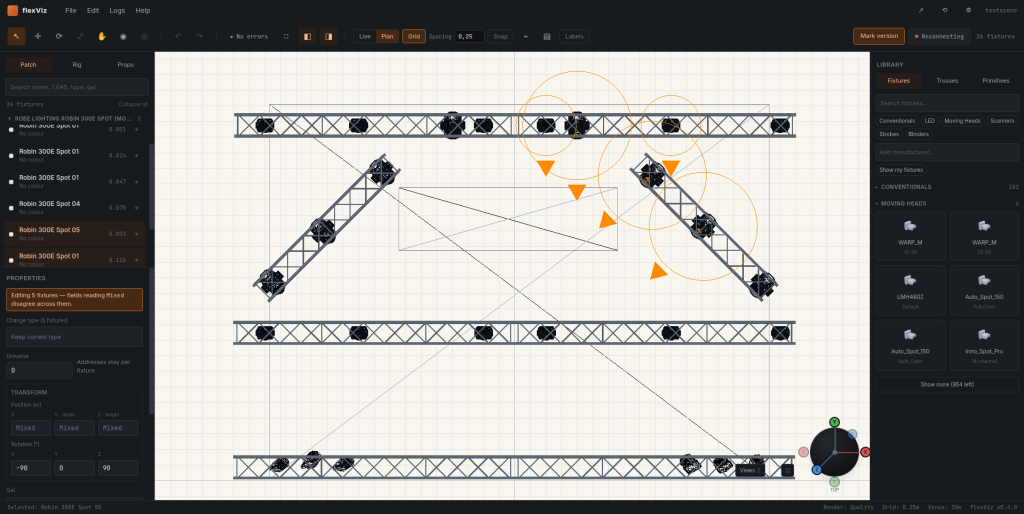
The first version of plan mode drew fixtures as symbols on a metric grid: correct positions, correct symbols, correct universe and address in the properties panel. It looked like a lighting plan and it was still missing the thing a lighting plan is for. You could see that there were four moving heads on the upstage truss. You could not see that three of them were aimed at the drummer.
Position is easy to draw because it is two numbers. Aim is a rotation, and rotations are the part of a rig people carry in their heads and then argue about on site. So plan mode got a forward marker: a short line out of every fixture symbol showing the direction the fixture actually points, in the plane you are looking at.
Where the direction comes from
MVR stores a fixture's placement as a 4×3 matrix: three basis vectors and a translation, in millimetres. Nothing in the file says "this fixture points stage left" — the direction is implicit in the basis. Taking the fixture's local forward axis through that basis gives a world-space direction vector, and projecting it onto the view plane gives the line to draw.
// MVR gives us a 4x3 matrix: three basis vectors + translation (mm).
// A fixture’s local forward is -Z; everything else falls out of the basis.

const LOCAL_FORWARD = vec3(0, 0, -1);

export function forwardMarker(fixture: Fixture, view: PlanView) {
  const basis = fixture.matrix.basis;            // world orientation
  const dir   = normalize(basis.transform(LOCAL_FORWARD));

  // Project onto the view plane. A marker pointing straight at the
  // camera collapses to a point — draw a dot rather than a lie.
  const flat = view.project(dir);
  if (length(flat) < 0.08) return { kind: "head-on" as const };

  return {
    kind: "line" as const,
    from: view.project(fixture.position),
    angle: Math.atan2(flat.y, flat.x),
    length: MARKER_PX / view.zoom,          // constant on screen
  };
}
The scale factor is deliberately not physical. A marker long enough to read at rig scale would be metres long and would cross half the stage; a fixed screen-space length keeps it legible at every zoom level without pretending to describe throw distance.
Moving heads are a different question
For a conventional the marker is the whole answer: the fixture is bolted where it is bolted and points where it points. For a moving head the rotation in the MVR describes how the yoke is hung, not where the head is currently looking. Those are two genuinely different pieces of information and conflating them would make the plan lie.
So plan mode draws the hang orientation as a solid marker, and — when the Bridge is connected and pan/tilt are coming in on DMX — the live aim as a second, dimmer marker offset from it. With the desk running you can watch the second marker swing while the first stays put. Without live data you only ever see the hang, which is the honest thing to show.
What it caught immediately
Three things, in the first week, in files that had already been through a real production:
- MIRRORED HANG
- A symmetrical side-light position where one side had been copied without flipping. Identical in the old plan, obviously wrong once both sides drew their aim.
- 180° YOKES
- Two washes hung backwards on the truss. Reachable in pan, so nobody had noticed, but half their range was pointing at the back wall.
- MY OWN AXES
- A sign error in the front-view projection that no amount of looking at positions would ever have surfaced. Drawing a thing is a good way to find out you were computing it wrong.
The marker is on by default in v1.0.0-beta1 and can be turned off per view. Next on this part of the app: aim annotation you can dimension, so a plan can state where a fixture is pointing rather than only show it.