Open your rig in a browser.
FlexViz reads the MVR and GDTF data your planning tools already produce, gives you a technical 2D plan and a live 3D view of the same scene, and can take Art-Net or sACN from your console through a small local bridge. It sits next to Vectorworks, Capture and your desk — it does not ask you to leave them.
The rig is clear in your head. It is not clear to anyone else.
You send the plan as a PDF at 14:00. The rig changes at 15:00.
The link you already sent shows the scene as it is now.
The customer asks what it will actually look like in the room.
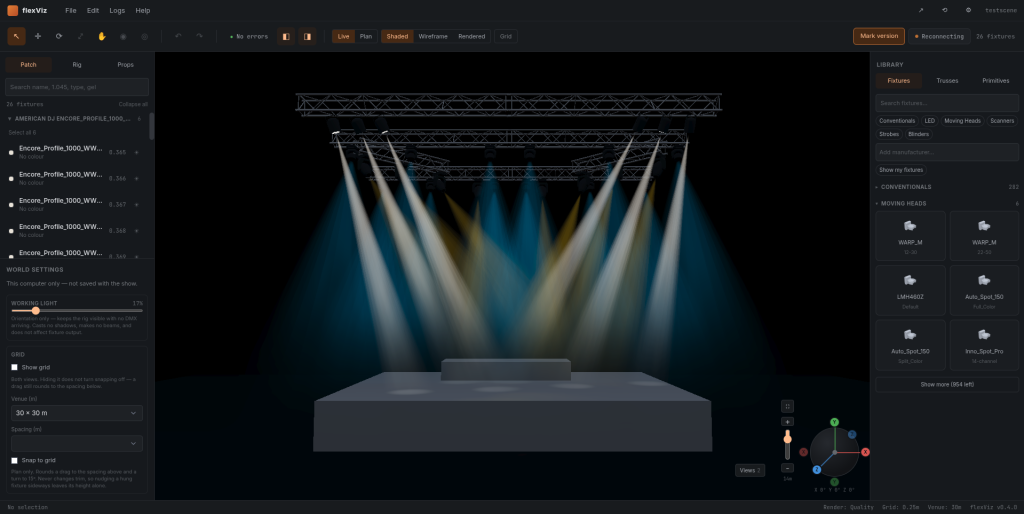
They open the lit scene on their own laptop and look around it themselves.
The person you need an answer from does not own the software it was drawn in.
A browser is the only thing they need. No licence, no install, no workstation.
None of that is a drawing problem, and none of it is solved by drawing faster. It is what FlexViz is for — and it is why it is worth half an hour of your own project now rather than after the next show.
Between the tools you use and the people you have to explain them to.
Most of the friction in a production is not drawing the rig. It is getting the rig in front of a client, a venue, a colleague on a laptop or a supplier who does not own the software it was drawn in.
-
01 · UPSTREAM
Your existing plan
Rig data drawn in Vectorworks or a comparable tool, fixture profiles from GDTF libraries, patch from the console.
MVR GDTF -
02 · FLEXVIZ
Open, edit, visualise
Import the scene in a browser tab. Work in a 2D technical plan or a shaded 3D view, patch fixtures, set positions and gel, and watch live levels while the desk runs.
Art-Net sACN -
03 · DOWNSTREAM
Everyone else
Send the scene as a link to a customer or a colleague, keep versions of what was agreed, and export back out to your own toolchain.
Share link Versions
Three things you can do this week.
Read the rig as a drawing, not a render.
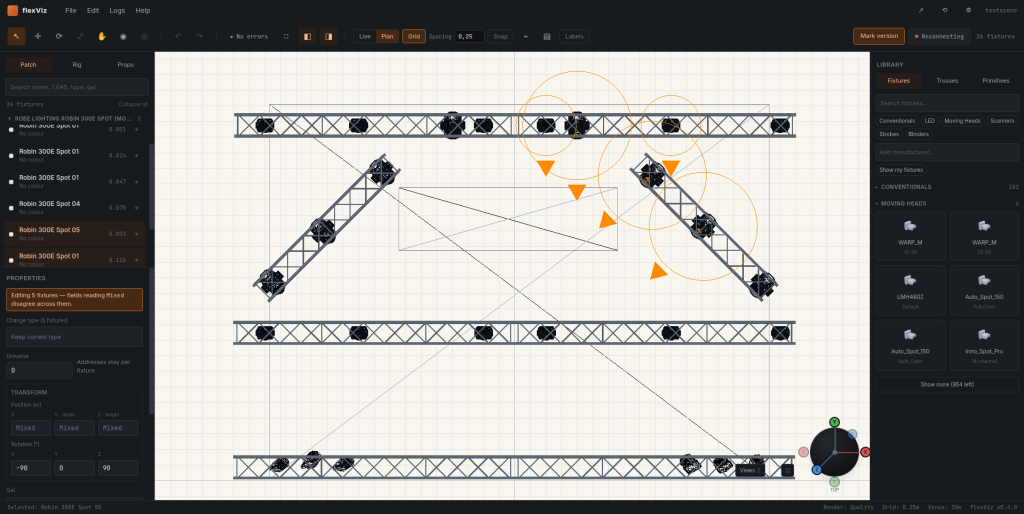
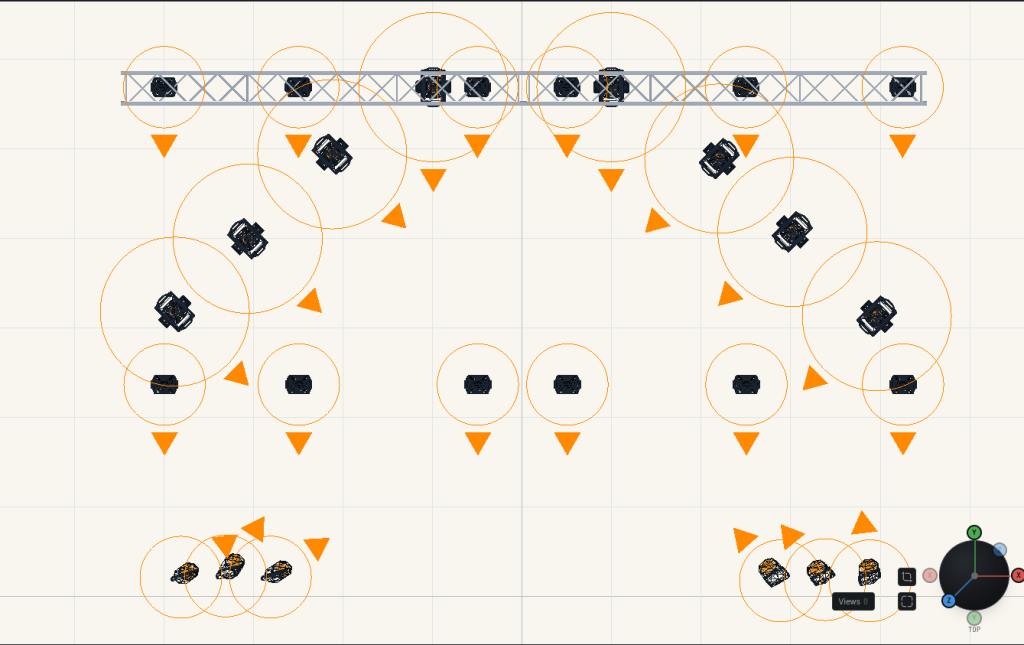
Top, front, left and right plan views on a metric grid, with fixture symbols, truss and the selected fixture's universe, DMX address, position and rotation in a properties panel. The same scene switches to shaded 3D without a re-import.
- Patch tree grouped by fixture type, with per-fixture universe and address.
- Fixture library with conventionals, LED, strobes, moving heads, scanners and blinders.
- Positions in metres, rotation in degrees — the numbers a technician can check.
See what the desk is actually doing.
Shaded, wireframe and rendered views of the scene with beams, working light and fog levels you can pull down to judge a look. Intensity and colour follow incoming DMX when the Bridge is connected, so you can check a state before it goes in front of an audience.
A small local app, not a new protocol.
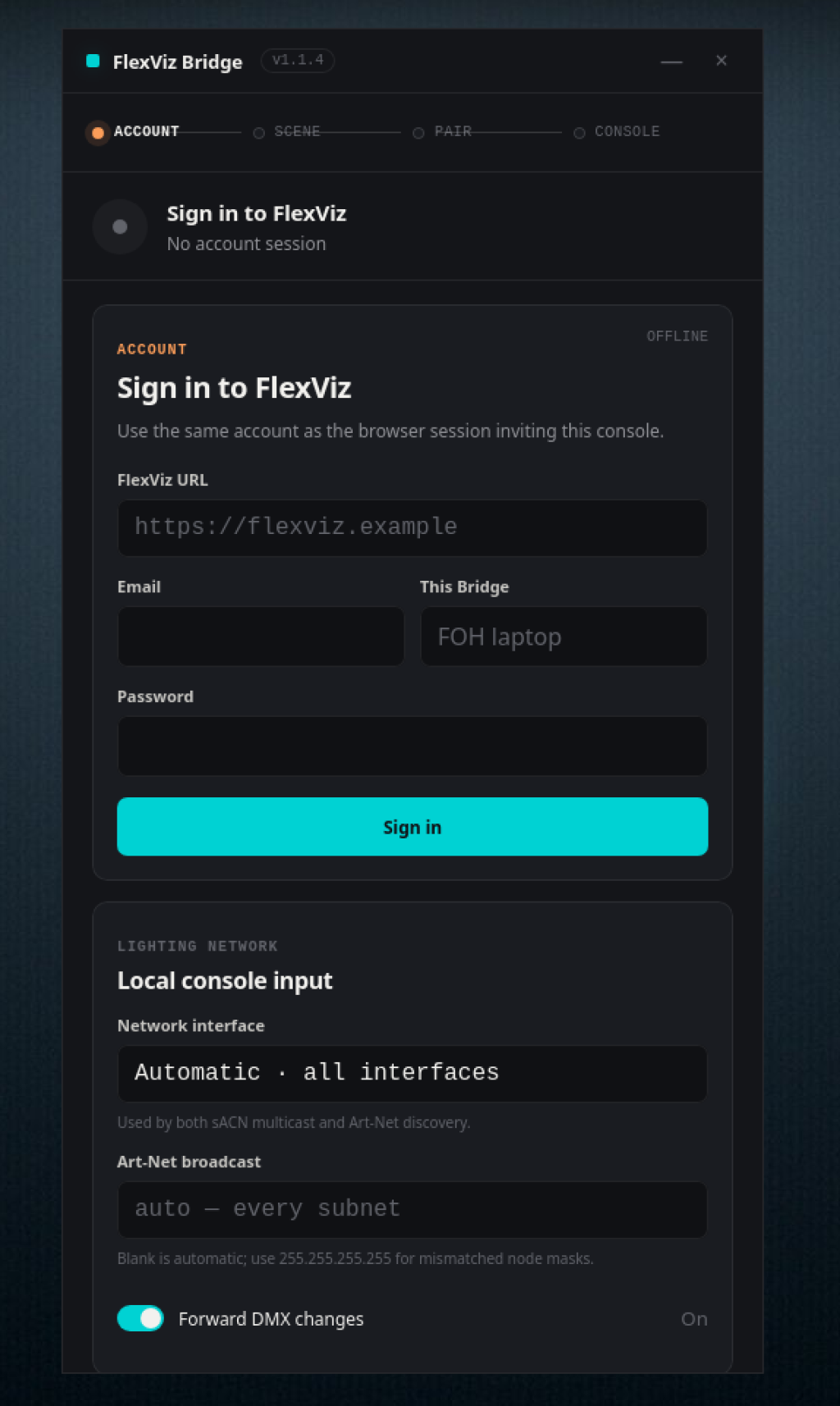
The Bridge runs on a machine on your lighting network, discovers Art-Net nodes, and forwards DMX to your browser tab over a websocket. It ships as selfcontained binaries for Windows and Linux — macOS is planned. Start it when you need live data, quit it when you don't. No dongle, no proprietary interface, no install.
The best view your hardware can handle.
FlexViz adapts rendering quality to the device instead of requiring a high-end workstation. Modern hardware gets the richer WebGPU path; unsupported or older devices fall back to WebGL2 with reduced effects. Same project, same plan — less GPU required.
Open formats in, open formats out.
FlexViz is built around the file and network standards the industry already agreed on, so a scene can leave again as easily as it arrived.
-
MVR
Scenes travel
Import a rig with its geometry and patch instead of redrawing it, and export it back for the tool that owns the drawing.
-
GDTF
Real fixture data
Fixture profiles carry modes and channel layouts, so the patch and the visualisation agree with the physical fixture.
-
Art-Net · sACN
Any console
Live levels come from whatever desk or software already speaks these protocols on your network.
-
No lock-in
Alongside, not instead
Keep Vectorworks, Capture and your console. FlexViz is the layer that makes moving between them and other people less work.
A link is the lowest common denominator.
A customer, a venue technician or a producer opens the scene in the browser they already have — no licence, no workstation, no exported PDF that is out of date by the afternoon. Versions are kept, so you can point at what was agreed and when.
-
Share a scene
Send the current state to someone outside the project without moving files around.
-
Version history
Keep the states a plan passed through, and go back to the one that was signed off.
-
One scene, one truth
Discussion happens on the current rig rather than on three different screenshots.
Under active development, and honest about it.
FlexViz is a working application with real functionality, not a prototype and not a finished product. Here is where the build stands.
-
WORKING NOW
- MVR / GDTF import
- Plan mode: top, front, left, right
- Live 3D: shaded, wireframe, rendered
- Patch with universe and DMX address
- Art-Net / sACN via FlexViz Bridge
- Adaptive rendering: WebGPU with WebGL2 fallback
- Scene sharing and version history
-
IN PROGRESS
- Broader fixture library coverage
- Truss and rigging editing
- Export back to MVR
- Performance on large rigs
-
PLANNED, NOT SHIPPED
- Realtime collaborative editing — targeted for beta 2
- MVR-xchange, to sync scenes with consoles and CAD on the venue network
- Comments on fixtures and cues
The Bridge runs on the machine at the desk.
The FlexViz Bridge is the small local app that takes Art-Net or sACN off your network and hands it to the browser. Install it on the machine that can see the console.
-
Release 1.1.4
Release notes (external link)Release von Flexviz Bridge .
What people ask before they try it.
- What file formats does FlexViz open?
- MVR scenes and GDTF fixture profiles — the data your planning tools already produce. A rig imports with its geometry and patch instead of being redrawn, and GDTF profiles carry modes and channel layouts, so the patch and the visualisation agree with the physical fixture.
- Does the person I share a scene with need to install anything?
- No. A scene is shared as a link and opens in the browser they already have — no licence, no install, no workstation. Only live DMX needs the FlexViz Bridge, and that runs on your machine, not theirs.
- How does FlexViz receive live DMX from a console?
- Through the FlexViz Bridge, a small local app that runs on a machine on your lighting network, discovers Art-Net nodes and forwards DMX to your browser tab over a websocket. It speaks Art-Net and sACN (E1.31), so whatever desk or software already uses those protocols on your network will work. No dongle, no proprietary interface.
- Which operating systems does the FlexViz Bridge run on?
- It ships as a Flatpak for Linux and a portable .exe for Windows. macOS is planned. Start it when you need live data and quit it when you do not.
- Do I need a high-end workstation to run it?
- No. FlexViz adapts rendering quality to the device. Modern hardware gets the richer WebGPU path; unsupported or older devices fall back to WebGL2 with reduced effects. Same project, same plan — less GPU required.
- Does FlexViz replace Vectorworks or Capture?
- No. It sits alongside them. Keep your existing drawing tool and your console — FlexViz is the layer that makes moving between them, and between you and everyone who has to understand the rig, less work.
- Is FlexViz finished?
- No. It is a working application soon having a closed beta, not a prototype and not a finished product. MVR and GDTF import, plan and live modes, patch with universe and DMX address, Art-Net and sACN through the Bridge, scene sharing and version history work today. Broader fixture library coverage, truss and rigging editing, export back to MVR and performance on large rigs are in progress.
Test it on a real project.
I am looking for lighting designers, operators, technical leads and event-technology companies who will open their own MVR files in FlexViz and tell me where it fails. Rough edges are expected; bug reports go straight to me, Hauke, the person who fixes them.