Present your lighting design: live, or on the client's own time
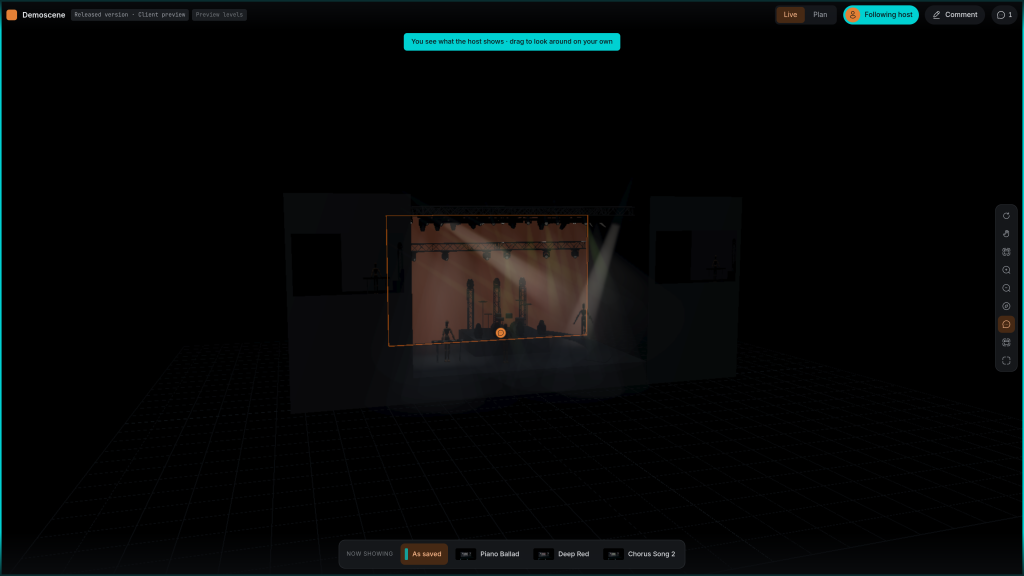
Present your lighting design to the client in their browser, in a live meeting or on their own time. You invite the client, venue technician or producer by email; they confirm their address and wait at your door until you let them in, or come straight in if you invited them. Live, they follow your camera and your looks while you talk them through the show. Between meetings they open the version you released, call up the saved looks and leave comments, while you keep working on the scene.
- YOU DECIDE WHO GETS IN
- Every guest confirms their email address first, and you see it before they are in. People you invited can come straight in; anyone else waits in the waiting room until you let them in or turn them away. You can remove any guest at any time.
- ADMIT ONCE, COME BACK ANY TIME
- Invited guests come back on their own, without waiting for you, until the link expires after 14 days or you revoke it.
- CHOOSE A MODE, FOLLOW THE HOST
- Guests choose Live or Plan themselves. During a live presentation, they can follow the presenter's camera within the mode they chose.
- THEY SEE THE RELEASE, NOT YOUR EXPERIMENTS
- Guests who come on their own see the latest released version of the scene, not the working version you are still changing. Release again when the next state is ready to show.
- SAVED LOOKS
- Up to ten looks travel with the release, each with a picture. A guest calls them up to see the moods of the show, with no desk and no Bridge running.
- LIVE DESK LEVELS
- In a live session with the Bridge connected, intensity and colour follow the console for everyone. A client can watch the look being built from their own laptop.
- SCREENS AND CAMERAS
- Video on the stage screens and the IMAG cameras play for your guests while you present.
- COMMENTS
- Guests you allow to comment point at a light, a truss or a spot on stage and write what they want changed. Each comment is private to your team or public for everyone shown the scene.
- ON A PHONE
- The link works on a phone too. Turn it sideways and the stage fills the screen.
- VERSION HISTORY
- The states a plan passed through are kept, so you can go back to the one that was signed off.
- ENDS WHEN YOU SAY SO
- A link runs for 14 days, and Revoke link ends it at once for everyone watching.
Depends on
On the guest's side, a current browser and the link, on a computer or a phone. No account and no install. On yours, a released version for guests who look on their own, and the scene open in FlexViz when you present live.
Not yet
Guests look and, if you allow it, comment; they cannot edit. Live desk levels need the Bridge running on your side. Without you, guests see the saved looks, and a screen shows the first frame of its playlist instead of the video. For working on the scene together, see real-time collaboration.
Open your own MVR against this and tell me where it breaks.