Plan checks: catch patch and rigging mistakes before the desk does
FlexViz checks the plan while you draw it. A counter in the toolbar says how many errors and warnings the scene has, and the Problems panel under the viewport lists them: fixtures without a patch, addresses that overlap, universes the project does not use, fixtures hanging in mid-air, moving heads too close to tilt past each other, and fixture bodies the GDTF did not bring. Click a row and the fixture is selected, so the fix is one step away.
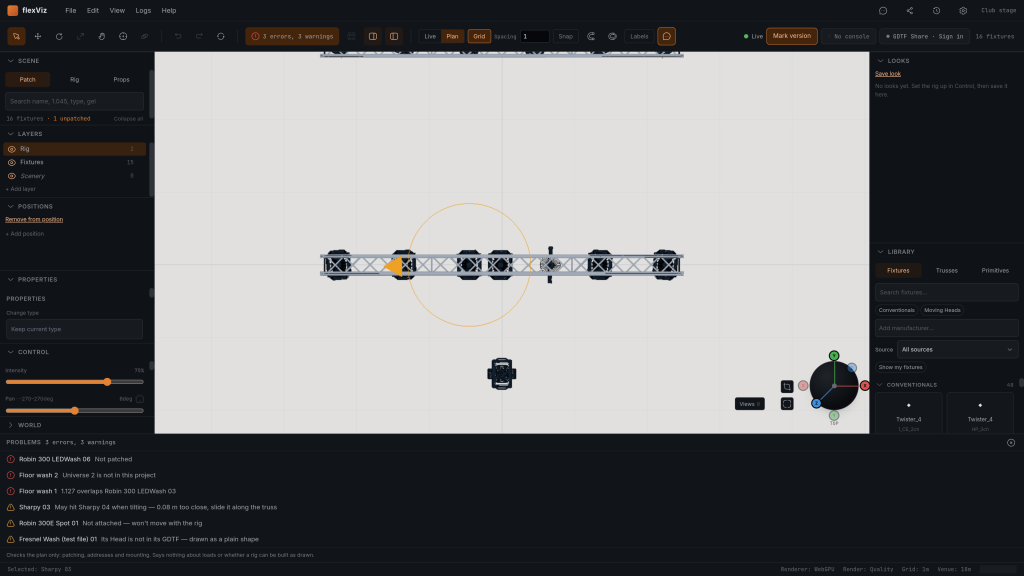
- COUNTED IN THE TOOLBAR
- The counter reads "No errors", or the number of errors and warnings. It names what it counted, so a clean scene is clean for patching and mounting, not for everything.
- PATCH ERRORS BEFORE THE DESK SEES THEM
- Unpatched fixtures, overlapping addresses and addresses past the end of a universe are errors. An overlap is also marked in the patch list, on both fixtures. The MVR export lists every conflict and asks for a second press, because some consoles refuse the whole patch when two fixtures share an address.
- CLEARANCE FOR MOVING HEADS
- Two heads mounted close enough to hit each other when they tilt get a warning that says how far and which way: "0.08 m too close, slide it along the truss". The distance includes the project's clearance margin, 100 mm by default.
- LOOSE FIXTURES
- A fixture in the air with nothing carrying it is a warning. One standing on the floor is not, because that is where floor fixtures belong.
- FIXTURE BODIES THE GDTF DID NOT BRING
- When a GDTF declares a 3D body FlexViz could not find, the panel says which part is missing. The fixture is still placed and patched, and the missing part is drawn as a plain box of the declared size.
- PLAN, NOT RIG
- The panel footer says it on screen: patching, addresses and mounting. Loads, clamps, safeties and whether the rig can be built as drawn stay with the rigger.
Depends on
A scene with fixtures. Universes are only checked once the project lists the ones it uses, under Project settings › General.
Not yet
It checks the plan, not the rig: patching, addresses and mounting. It says nothing about loads, rigging hardware or whether a rig can be built as drawn. Whether a fixture stands outside the stage is not checked.
Open your own MVR against this and tell me where it breaks.