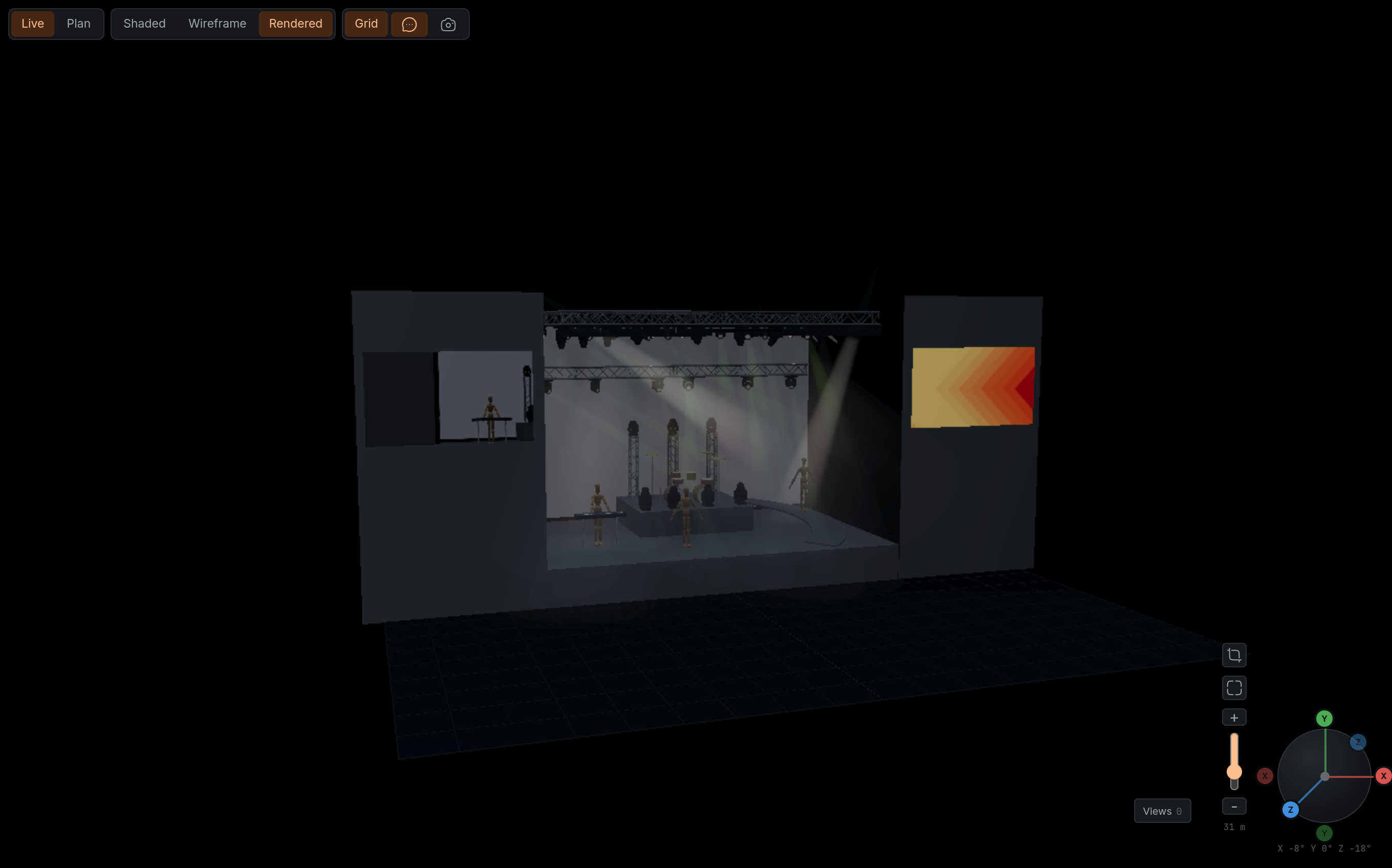
Beta 2 put a team and a client around the rig. 1.1.0-beta1 builds the stage around it: ramps, screens, backdrops and props, video and IMAG cameras on the screens, and an editor rearranged into workspaces, so each job has the panels it needs. Here is what changed, and where the documentation explains it properly.
An editor in six workspaces
The window now has workspaces: Rig, Patch, Focus, Review, Present and Media, on the keys 1 to 6. Each one puts the editors a job needs around the viewport: the Outliner, Properties and the Library for rigging, the Patch editor and DMX Universe for addresses, Control and the looks for lighting. Switching keeps the scene and the selection, and each workspace keeps its own view, which you can save as your personal default.
Ctrl K finds any command by name. Looks are tiles with a picture of the rig, so a look is recognised before it is recalled.
→ Workspaces · Editors
The stage, not just the rig
The Library's Primitives tab has three new shapes you set by measurement rather than by scaling: a ramp, a screen, flat or curved, with its aspect ratio locked to 4:3, 16:9 or 16:10, and a backdrop that carries your logo or a picture of the set. The Props tab adds stock models: mannequins and musicians, amps and cabinets, mic stands, a wedge and drum kits. Models by other authors name their author and licence.
All of it goes into an MVR export at its true size and place, and screens come back from an MVR as screens.
Screens, video and IMAG cameras
A screen shows a channel: a playlist of video, stills or cameras, played and cut in the Player. Upload MP4, WebM or images to the project, or import a playlist from an M3U file. Place an IMAG camera in the rig, set its focal length, look through it, and cut between cameras on the side screens. Everyone in the scene, and the guests of a presentation, see the same playback and the same cut.
FlexViz previews; it is not a media server or a vision mixer. On a busy computer, camera pictures step down in frame rate and size before the main view does.
→ Screens, media and cameras · The feature in short
Presenting, with its own workspace
Presenting moved into the Present workspace: the waiting room on the left, the looks on the right, comments under the viewport. The guest's side was rebuilt for a desk and for a phone; held sideways, the stage fills the screen. Guests pick looks from their pictures, and they start without IMAG camera symbols in the way.
Presenting no longer needs a collab seat. Owners and managers of a project present; it never changes the scene.
→ Present to a client · What your client sees
Who reaches which project
Projects are now reached by assignment. A member sees only the projects they are on, as Owner, Manager or Planner: Planners edit and export, Managers also present and assign people, Owners also release and lock. Organisation owners reach every project.
Editing together is on for every organisation. Every organisation starts with five collab seats for the team and five presentation seats for guests. Inviting someone, or presenting, needs a confirmed email address first.
→ Work together · Collab seats and roles
Getting started
A new Get started section covers the account: signing up, the demo show it opens on, confirming your address, your organisation and its seats, and closing the account again. The Quickstart was rewritten as ten steps on the demo, from a first look to a client presentation, a comment answered and a colleague invited.
MVR in and out
Screens leave an export as MVR video screens with a test card and come back as screens you can put on a channel. Ramps, backdrops and props are written with their geometry and images. On import, projectors and supports arrive as scenery, pan and tilt invert are read instead of reported as lost, and objects keep the IDs the file gave them, so a round trip hands the other tool its own IDs back.
→ MVR in and out · Scenery in an MVR export
Smaller things you will notice
Help › About FlexViz… shows the build you are running and the credits for models, textures and libraries.
A duplicated fixture is never mounted on the original's truss; duplicated trusses and props get the next free name.
A mode without a dimmer but with a single colour channel gets Intensity on that channel.
A look you just recalled no longer reads modified.
A saved view more than 40 m out comes back where it was saved.
The working light tops out at 25 %.
Optional product analytics, off unless you tick it, and changeable under Profile › Privacy.
The Bridge renews its login while it runs, and is told when its account has been closed.
New documentation
The documentation was rewritten for the release: new sections for Get started, Stage and scenery and Screens, media and cameras; Share became Present; the Quickstart, Work together, MVR, Organise, Plan checks and the Bridge follow the new editor; the Reference explains workspaces and editors instead of sidebars. Every screenshot is new.
If something does not behave the way this post says, Help › Report a bug… goes straight to us.
The full list
New
Six workspaces with their own views and personal defaults; command search
Ramps, screens and backdrops from measurements; stock props with credits
Media channels, the Media bin and the Player; M3U import
IMAG cameras, cut between on screens, with an adaptive quality controller
Present workspace; guest viewer for desk and phone
Projects by assignment; Owner, Manager and Planner roles
Collaboration for every organisation; collab and presentation seats
Email confirmation before inviting or presenting
Account closing with a 14-day grace period
Looks with pictures
MVR: screens as video screens, scenery geometry and images, projector and support import
About FlexViz with build and attributions
Optional, consent-based product analytics
Fixed
MVR import reads pan and tilt invert and keeps the file's IDs
MVR export: one GDTF per source, images upright, local SVG gradients
GDTF Share profiles offered again for body-less fixtures on import
Copies are never mounted on the original's carrier; free names for trusses and props
A lone colour channel dims a mode without a dimmer
A freshly recalled look is not marked modified
Saved views beyond 40 m come back where they stood
Gels kept on white-only LED profiles